
In short
Acronis Email Archiving captures every email sent and received in Microsoft 365 into an immutable, AES-256 encrypted archive with retention rules, legal hold, eDiscovery search and exportable audit logs. It runs as a cloud service in Acronis Cyber Platform, is licensed per seat with unlimited cloud storage, and can be billed monthly, terms confirmed at quote.
Get a quote for Acronis Email Archiving licensing
Tell us roughly how many users or sites you have and we will come back to you with options and a quote.
What Acronis Email Archiving is
An email archive is not the same as a backup. A Microsoft 365 backup (opens in a new tab) exists so you can put things back after deletion or attack. An archive exists so you can prove what was sent and received, years later, and find it quickly when a regulator, lawyer or customer asks.
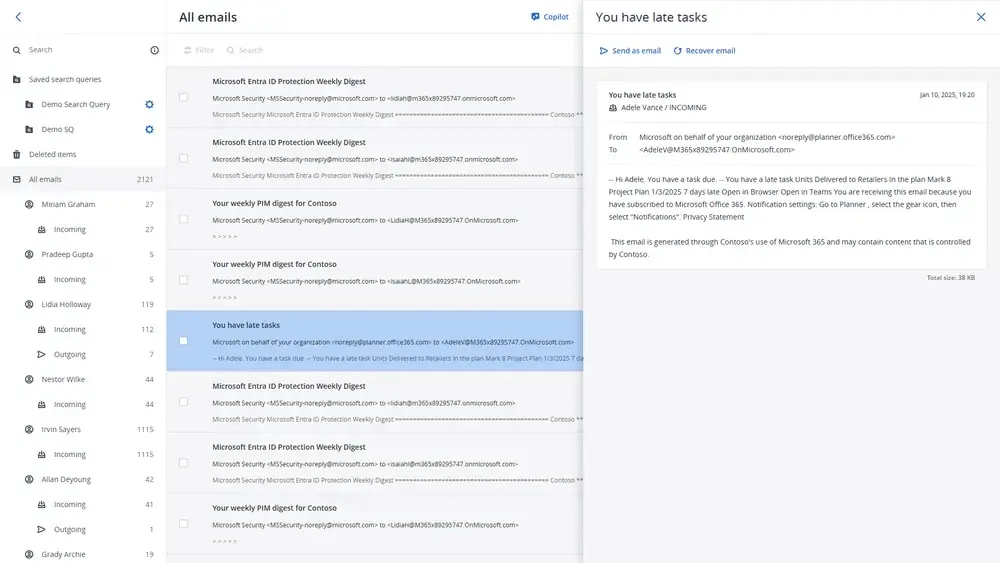
Acronis Email Archiving is designed for Microsoft 365. It archives every sent and received email automatically to the Acronis cloud and keeps it in immutable storage, managed in Acronis Cyber Platform (opens in a new tab) (formerly Cyber Protect Cloud). Users cannot quietly delete messages from it, which is what gives the archive its evidential value.
In the product

What is included
| Capability | What it gives you |
|---|---|
| Automatic capture | Every email sent or received in Microsoft 365 is archived without user action |
| Immutable storage | Archived messages are protected from alteration or deletion, under your immutability settings |
| Retention rules | Keep mail for the precise period your organisation requires; retention is indefinite by default |
| Legal hold | Keep relevant messages beyond their normal retention period during a dispute or investigation |
| eDiscovery and search | Full-text and advanced queries, saved searches and preview before recovery |
| Audit | Exportable audit logs to support compliance reviews and forensic investigations |
| Encryption and access | AES-256 encryption of archived email, with access restricted to authorised users |
Archiving and backup run side by side in the same console, so you can hold both without a second vendor.
Not sure which option fits? Ask us
Tell us what you need and we will recommend the right option for your organisation, with a quote.
How Acronis Email Archiving licensing works
Acronis Email Archiving is seat-based: each archived Microsoft 365 mailbox needs a licence, and cloud-to-cloud archiving licences come with unlimited cloud storage, so archive growth does not change the bill. Through Forever Systems it can be billed monthly, terms confirmed at quote.
Email Archiving is also one of the seven capabilities in Acronis Protected 365, so it can be added to an existing Acronis Microsoft 365 backup without a new supplier. Ask us for a quote with your mailbox count and we will confirm the options for your tenant.
Requirements and compliance
You need a Microsoft 365 tenant and an administrator to approve the Acronis application; there is no hardware and no mailbox migration. Acronis positions the archive to support programmes such as GDPR, NIS 2, ISO 27001 and PCI DSS, and in the UK it can support UK GDPR record keeping, subject access requests and sector record retention rules, such as those faced by financial services and legal firms. The archive helps you meet these obligations, and we help you configure it and set retention to match your actual policy.
Is Acronis Email Archiving licensing the right fit for you?
We will check it against your systems and requirements and recommend the right option.
Who it suits
Regulated and record-heavy organisations: financial advisers, accountants, solicitors, recruiters, housing associations, schools and public sector bodies that receive subject access or freedom of information requests. It also suits any business that has had to reconstruct an email trail for a dispute and found deleted messages were gone.
How we help
We connect your tenant, agree retention and legal hold procedures with you, and show your compliance lead how to search and export. Licence counts follow your users month by month.
Compare it with the other email security software (opens in a new tab) we supply.
Acronis Email Archiving licence pricing
Acronis sells Email Archiving as a separate licence edition, priced per seat, and also makes it part of Acronis Protected 365, so you can price it on its own or alongside Acronis Microsoft 365 backup. The mailboxes you archive set the figure. Tell us about your mailboxes and we can quote both routes.
- Licence edition: Email Archiving on its own, or within Acronis Protected 365
- Seats: The mailboxes you archive
Get a quote for Acronis Email Archiving licensing
Tell us what you need and we will come back to you with a quote.
How Forever Systems helps with email archiving
We are an independent UK IT and cyber security provider. We supply NinjaOne SaaS Backup with Archiver for organisations on Microsoft 365 or Google Workspace, along with Mimecast, Barracuda and Hornetsecurity archiving where one of those suits you better, and help you get the archive set up, the policies right and the people who need it confident using it.
- Scoping: we look at your mailboxes, leavers, legacy archives and record-keeping obligations, and what your Microsoft 365 or Google Workspace plan already includes, before suggesting anything new
- Set-up: we can configure journaling for Exchange Online or Google Workspace, connect the archive and check that mail is arriving
- Retention and legal hold: we help you turn your email retention policy into archive rules, and show your compliance or HR lead how to search, hold and export
- Leavers and legacy archives: we can help you plan how former employees' mail and older archives are brought across, with the approach confirmed at quote
- Backup alongside the archive: the same NinjaOne per-user licence also covers backup of your Microsoft 365 or Google Workspace data, so recovery and record-keeping are planned together
We work with businesses, schools, charities and public sector organisations. If you also need wider protection, our independent cloud security guides are on cloud-security.cloud.
Frequently asked questions
What is the difference between email backup and email archiving?
Backup lets you restore lost or damaged mail. Archiving keeps an immutable, searchable record of all mail for compliance, legal hold and eDiscovery. Many organisations need both, and Acronis offers both in one console.
Does Acronis Email Archiving work with Microsoft 365?
Yes. It is designed for Microsoft 365 and runs as a cloud service, with no hardware or mailbox migration.
Can users delete archived emails?
No. The archive uses immutable storage, so messages are kept until your retention period ends, and legal hold can keep relevant messages for longer.
How is Acronis Email Archiving licensed?
Per seat, for each archived Microsoft 365 mailbox, with unlimited cloud storage included. Through Forever Systems it is billed monthly.
How much does Acronis Email Archiving cost?
Acronis Email Archiving pricing depends on quantity and term, because it is licensed per seat. We provide a bespoke quote for every order: contact us to buy Acronis Email Archiving and we will confirm the right Acronis Email Archiving licence, then handle the order, changes and renewals on your Forever Systems account.
Still have a question about Acronis Email Archiving licensing?
Ask us and a member of our team will get back to you.