
In short
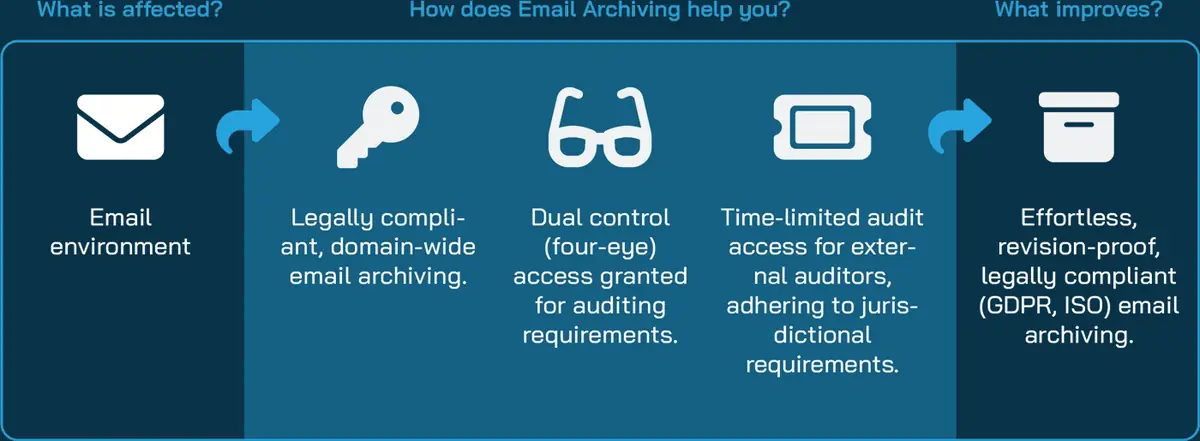
Hornetsecurity email archiving stores each inbound and outbound message automatically in Hornetsecurity's data centres, where it cannot be edited or deleted before its retention period ends. Hornetsecurity includes unlimited storage per user, and the service is part of 365 Total Protection from Plan 2 Enterprise. Forever Systems can quote and set up Hornetsecurity Email Archiving.
Get a quote for Hornetsecurity email archiving
Tell us roughly how many users or sites you have and we will come back to you with options and a quote.
What Hornetsecurity Email Archiving is
Hornetsecurity's Email Archiving page (opens in a new tab) describes the service as email data integrity and compliance "for M365 and other email servers". It works as part of Hornetsecurity's cloud email service: Hornetsecurity says all incoming and outgoing emails are stored automatically "in their original form in Hornetsecurity's data centers immediately upon arrival and dispatch".
Two points define it as an archive, not a mailbox feature. Hornetsecurity says archived emails "cannot be edited or deleted before the set retention period has expired", and that they are held in encrypted databases. Because archiving is automatic, administrators have no routine archiving tasks to run.
For the background, see what is email archiving?. Hornetsecurity's Microsoft 365 suite is covered on our email security site under Hornetsecurity 365 Total Protection (opens in a new tab).
What Hornetsecurity Email Archiving includes
| Capability | What Hornetsecurity says |
|---|---|
| Automatic capture | Every incoming and outgoing email is archived on arrival and dispatch; archiving internal emails is optional |
| Unalterable storage | Messages are kept in their original form and cannot be edited or deleted before the retention period ends |
| Retention periods | Retention periods can be regulated, and changes to them are logged |
| Search | A full-text index of messages and attachments, with search by date, sender, recipient and subject |
| Auditor access | Time-limited read access for an auditor to a domain's archive, set up by the administrator under a four-eyes principle |
| Audit log | A log of all access to the archive, including the user's login name and IP address, which cannot be edited or deleted |
| Privacy controls | Administrators see metadata but not message content; individual users can be excluded, and users can mark private mail |
| Delegated access | A user can give another user access to their archive, for example to cover absence |
| Import and export | Import of older mail from .pst files, and export of the archive at any time |
| Restore | Emails deleted from the mail server by mistake can be restored from the archive |
| Storage | Unlimited storage per user included |
The auditor access is the feature that stands out for regulated firms: an outside auditor can be given a time-limited view, and the administrator can then see in the audit log what was viewed. Our pages on FCA email retention and email retention policy cover the rules such access supports.
Not sure which option fits? Ask us
Tell us what you need and we will recommend the right option for your organisation, with a quote.
How it is deployed
Hornetsecurity Email Archiving depends on mail flowing through Hornetsecurity's cloud. Hornetsecurity's email security modes page compares three ways of connecting its services to Microsoft 365, and its feature table shows Email Archiving in two of them:
| Mode | How it connects | Email Archiving |
|---|---|---|
| MX mode | MX records route inbound and outbound mail through Hornetsecurity's gateway | Available |
| Hybrid mode | Gateway filtering plus an API connection for checks after delivery | Available |
| API mode | API connection only, with no change to mail routing | Not available in this mode, according to Hornetsecurity's table |
So the practical requirement is an MX or Hybrid deployment. If you already use Hornetsecurity's filtering in one of those modes, the archive is an addition to a mail flow you have; if you do not, the MX change is part of the project. An archive that leaves mail routing unchanged works differently: NinjaOne Archiver receives a journal copy from Microsoft 365 or Google Workspace, as email journaling explains.
Hornetsecurity Email Archiving: UK licensing and buying at a glance
| Buying question | Answer |
|---|---|
| What you license | Each user, with unlimited storage per user included according to Hornetsecurity |
| How it is packaged | As the Email Archiving service, or within 365 Total Protection from Plan 2 Enterprise upwards |
| Platforms | Microsoft 365 and other email servers, with mail routed through Hornetsecurity in MX or Hybrid mode |
| Billing | Monthly billing may be available, confirmed at quote |
| Older mail | Import from .pst files, with the approach confirmed at quote |
| Where data is held | In Hornetsecurity's data centres; we confirm the location for your account at quote |
| How to buy | Ask us for a quote with your user count and whether you already use Hornetsecurity |
Sources (checked 11 November 2026): Hornetsecurity's Email Archiving page, 365 Total Protection page and email security modes page.
Is Hornetsecurity email archiving the right fit for you?
We will check it against your systems and requirements and recommend the right option.
How Hornetsecurity Email Archiving compares with the other archives we supply
| NinjaOne Archiver | Mimecast Cloud Archive | Barracuda Cloud Archiving Service | Hornetsecurity Email Archiving | |
|---|---|---|---|---|
| How it is sold | An add-on plan of NinjaOne SaaS Backup (opens in a new tab), per user, with backup in the same bundle | Mimecast A1, the Archive add-on to a Mimecast Cloud Gateway email security plan, with further archive add-ons | Listed in the Premium Plus plan of Barracuda Email Protection, licensed per user | A Hornetsecurity service, also part of 365 Total Protection from Plan 2 Enterprise |
| Mail platforms the vendor names | Microsoft 365 and Google Workspace | Confirmed at quote | Microsoft 365, Google Workspace, Microsoft Exchange Server and other servers that support SMTP journaling | Microsoft 365 and other email servers |
| What the vendor highlights | Real-time journaling, immutable WORM storage and compliance review roles | Self-service e-discovery, Supervision review tools, Archive for Microsoft Teams and Archive Power Tools | A tamper-proof repository outside your mail system, an Outlook add-in and case-by-case legal hold | Automatic archiving on arrival and dispatch, time-limited auditor access and an audit log |
| Storage | An allowance of up to 250 GB for each paid seat, assessed in aggregate | Confirmed at quote | No retention or storage limits, per Barracuda | Unlimited storage per user included, per Hornetsecurity |
| Older mail | Ingestion of zipped EML or PST files | Mimecast Data Import | PST and ZIP import | Import from .pst files |
| Read more | NinjaOne Archiver | Mimecast email archiving | Barracuda email archiving | This page |
Each column summarises that vendor's own published description, read on 11 November 2026 (Mimecast re-read on 12 November 2026): NinjaOne's Email Archiver page, Mimecast's Email Archive page and plans page, Barracuda's cloud archiving page and plans page, and Hornetsecurity's Email Archiving page and 365 Total Protection page. "Confirmed at quote" means the vendor's page does not state the point. Capabilities differ by plan and edition, so check the edition before you buy; our email archiving software checklist lists the questions to ask.
How Forever Systems helps
We can check whether Hornetsecurity Email Archiving or another archive suits your mail platform, quote it as a service or within a 365 Total Protection plan, and help with the mail routing, retention periods and auditor access. We can also help you plan the import of PST files from an older system.
Pricing depends on the plan, the number of users and the term, so ask us for a quote. Contact us and tell us which mail system you use and what you need to keep.
How Hornetsecurity email archiving is priced
Hornetsecurity offers Email Archiving as a service and includes it in 365 Total Protection from Plan 2 Enterprise upwards, with Plan 3 adding backup, so the first choice is whether you take archiving on its own or within a plan that also covers email security. Unlimited archive storage is included, and archiving works with mail routed through Hornetsecurity in MX or Hybrid mode. The plan and the people whose mail you archive set the quote.
- Plan: Email Archiving on its own, or 365 Total Protection Plan 2 and above
- Mode: Mail routed through Hornetsecurity in MX or Hybrid mode
- Storage: Unlimited archive storage included
Monthly billing may be available, confirmed at quote.
Get a quote for Hornetsecurity email archiving
Tell us what you need and we will come back to you with a quote.
How Forever Systems helps with email archiving
We are an independent UK IT and cyber security provider. We supply NinjaOne SaaS Backup with Archiver for organisations on Microsoft 365 or Google Workspace, along with Mimecast, Barracuda and Hornetsecurity archiving where one of those suits you better, and help you get the archive set up, the policies right and the people who need it confident using it.
- Scoping: we look at your mailboxes, leavers, legacy archives and record-keeping obligations, and what your Microsoft 365 or Google Workspace plan already includes, before suggesting anything new
- Set-up: we can configure journaling for Exchange Online or Google Workspace, connect the archive and check that mail is arriving
- Retention and legal hold: we help you turn your email retention policy into archive rules, and show your compliance or HR lead how to search, hold and export
- Leavers and legacy archives: we can help you plan how former employees' mail and older archives are brought across, with the approach confirmed at quote
- Backup alongside the archive: the same NinjaOne per-user licence also covers backup of your Microsoft 365 or Google Workspace data, so recovery and record-keeping are planned together
We work with businesses, schools, charities and public sector organisations. If you also need wider protection, our independent cloud security guides are on cloud-security.cloud.
Frequently asked questions
Is email archiving included in Hornetsecurity 365 Total Protection?
Yes, from Plan 2 Enterprise. Hornetsecurity says that plan adds AI-based advanced threat protection, business continuity and email archiving to Plan 1 Business. Email Archiving is also available as a Hornetsecurity service.
Does Hornetsecurity Email Archiving need an MX record change?
Hornetsecurity's email security modes table shows Email Archiving in MX mode and Hybrid mode, where mail is routed through Hornetsecurity, and not in API mode. So archiving goes with an MX or Hybrid deployment.
Can administrators read archived emails in Hornetsecurity Email Archiving?
Hornetsecurity says administrators can see the metadata of archived user emails but not the content. Auditors can be given time-limited read access to a domain's archive, and every access is recorded in an audit log.
Can old PST files be imported into Hornetsecurity Email Archiving?
Hornetsecurity says emails and attachments can be imported into the archive from .pst files, so older mail can be archived again. We confirm the approach for your data at quote.
Still have a question about Hornetsecurity email archiving?
Ask us and a member of our team will get back to you.